Enetdocs Database
A Flask-based web application for managing and organizing academic resources from Google Drive with MongoDB integration
Project Overview
The ENET'Com Academic Archive System is a comprehensive web-based platform designed to manage and organize academic documents for engineering students. This system bridges the gap between Google Drive storage and a structured database, providing students with an intuitive interface to access course materials organized by program, year, semester, and subject.
Architecture & Technology Stack
The project is built on a modern Python web stack, leveraging Flask as the web framework, MongoDB for flexible document storage, and the Google Drive API for seamless integration with cloud storage. The architecture follows a three-tier model: a presentation layer with HTML templates, a business logic layer handling data processing and API interactions, and a persistence layer using MongoDB for hierarchical data management.
Key Components
Backend Framework: The Flask application (app.py) serves as the core engine, providing RESTful endpoints for data retrieval and CRUD operations. It manages routing, query parameter handling, and database interactions through PyMongo.
Google Drive Integration: The driveapi.py module handles authentication and communication with Google Drive's API, enabling the system to fetch file metadata, generate shareable links, and maintain synchronization between the cloud storage and local database.
Data Scraping Pipeline: The scrapers.py module implements intelligent traversal algorithms that recursively explore Google Drive folder structures, extracting file metadata and organizing it into a hierarchical JSON format.
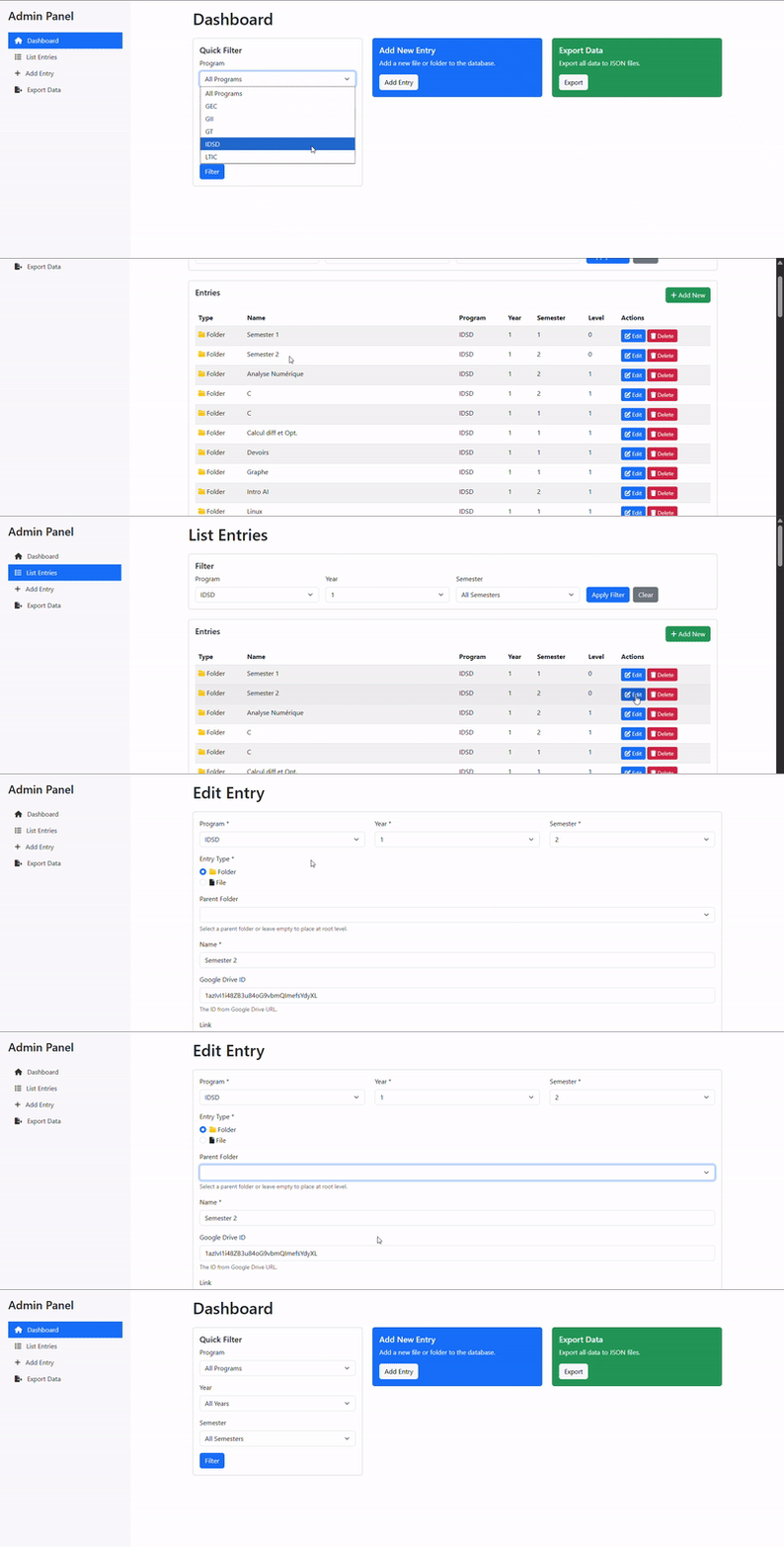
Admin Interface: A dedicated admin panel (admin_server.py and admin.html) provides authorized users with tools to manage the document database, update entries, and maintain data consistency.
Database Structure & Organization
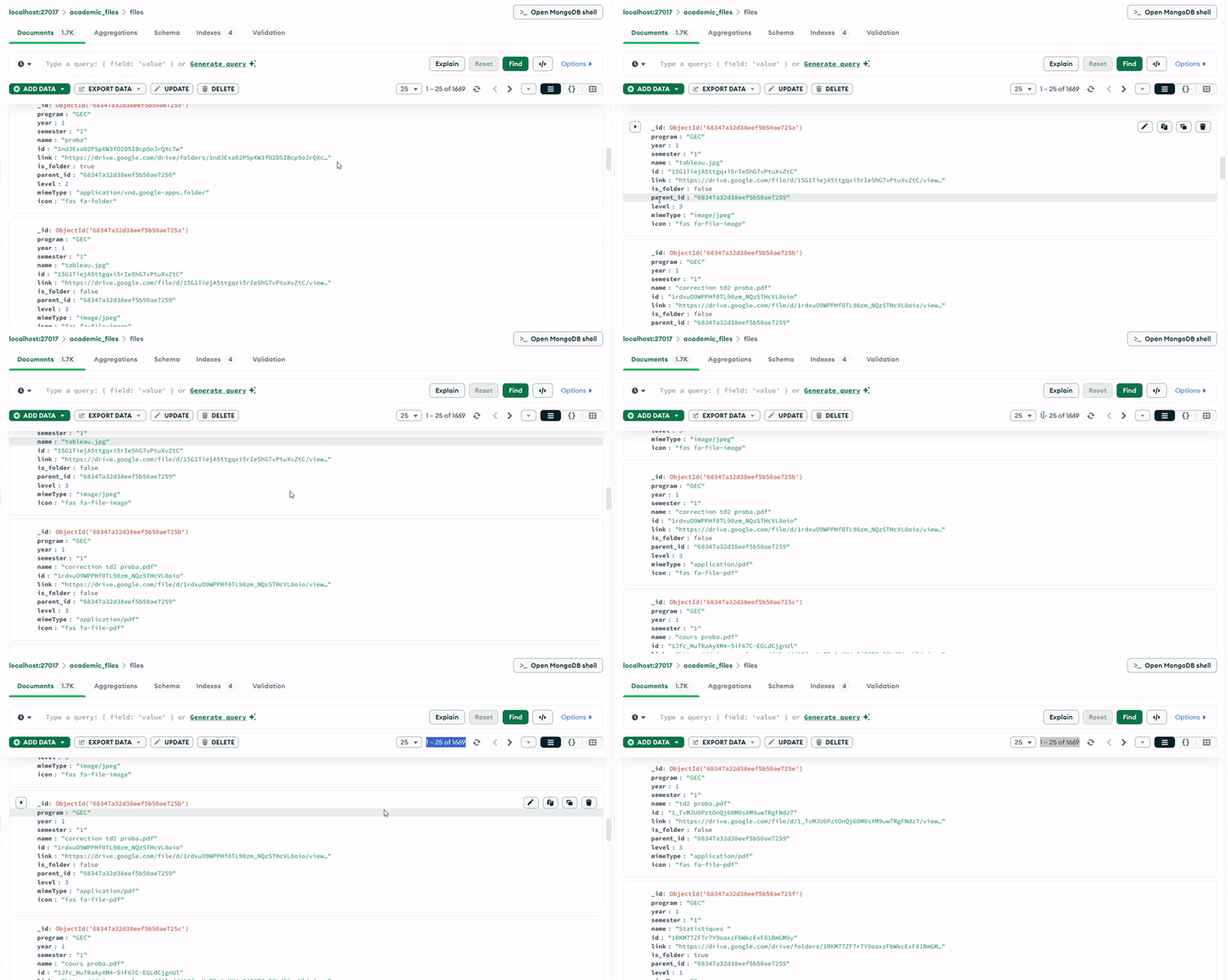
The MongoDB database (academic_files) uses a single collection (files) with a carefully designed schema that supports hierarchical organization. Each document represents either a folder or a file, with fields that capture both the Google Drive metadata and the academic context.
Document Schema
Documents in the MongoDB collection follow a consistent structure with the following key fields:
- program: Identifies the engineering program (e.g., "GII", "IDSD", "GT", "GEC")
- year: Integer representing the academic year (1, 2, or 3)
- semester: Indicates the academic semester
- name: The file or folder name as it appears in Google Drive
- id: The unique Google Drive identifier
- link: The shareable URL for accessing the resource
- is_folder: Boolean flag distinguishing folders from files
- parent_id: Reference to the parent folder, enabling tree traversal
- level: Integer indicating the depth in the hierarchy (0 for semesters, 1+ for nested items)
- mimeType: The MIME type from Google Drive (e.g., "application/pdf", "application/vnd.google-apps.folder")
- icon: Font Awesome icon class for UI representation
Hierarchical Organization
The system implements a multi-level hierarchy where:
Level 0: Top-level semester folders serve as entry points Level 1: Subject folders or standalone files within semesters Level 2+: Nested subfolders and files within subjects
This structure is enforced through the parent_id relationship and maintained by indexes on (program, year, semester), (parent_id), and (is_folder) for optimal query performance.
JSON Data Format
The static JSON files stored in static/data/ provide a cached, denormalized view of the database optimized for frontend consumption. Each file (e.g., GII_2nd_Year.json) contains a complete snapshot of documents for a specific program and year combination.
Here's a representative sample of the JSON structure:
{
  "subject": "semester 1",
  "id": "1YgYlTOU_EU7zpMExKDFO1WCfOiANPVpl",
  "link": "https://drive.google.com/drive/u/0/folders/...",
  "files": [],
  "subfolders": [
    {
      "name": "reseau",
      "id": "1LpcWGByYkp6pLY_KQ4dPU56s-P3cTJDa",
      "mimeType": "application/vnd.google-apps.folder",
      "link": "https://drive.google.com/drive/folders/...",
      "icon": "fas fa-folder",
      "files": [
        {
          "name": "TD Reseaux Informatiques.pdf",
          "id": "1eCb8Ll_Bl5WDaHiAvkgBZ4Ja-AOryOhR",
          "mimeType": "application/pdf",
          "link": "https://drive.google.com/file/d/...",
          "icon": "fas fa-file-pdf"
        }
      ],
      "subfolders": []
    }
  ]
}
This nested structure mirrors the folder hierarchy in Google Drive while adding metadata like icons for rich UI rendering. The mimeType field drives the icon selection logic, allowing the frontend to display appropriate visual indicators for PDFs, folders, documents, and other file types.
Data Processing Workflow
The system employs a sophisticated data pipeline that transforms raw Google Drive API responses into structured, queryable documents:
- Discovery Phase: The scraper authenticates with Google Drive API and traverses the folder hierarchy starting from root semester folders
- Metadata Extraction: For each item, the system captures essential attributes (name, ID, MIME type) and generates shareable links
- Hierarchical Mapping: Items are organized into a parent-child relationship with level tracking
- Database Persistence: Documents are inserted into MongoDB with appropriate indexes
- JSON Export: Aggregated data is serialized to static JSON files for fast client-side access
File Organization Strategy
The project uses a clean separation of concerns in its file structure:
Core Application Files: app.py handles web requests, driveapi.py manages external API calls, and scrapers.py processes data
Templates: HTML files in templates/ follow a base template pattern with specialized views for listing, editing, and adding entries
Static Assets: The static/data/ directory contains JSON snapshots organized by program and year
Configuration: docker-compose.yml defines the MongoDB containerization setup for easy deployment
Technical Highlights
Recursive Folder Traversal: The scraper implements depth-first traversal to handle arbitrarily nested Google Drive structures
Caching Strategy: Static JSON files reduce database load and API calls, while maintaining data freshness through periodic updates
Query Optimization: MongoDB indexes on frequently-filtered fields ensure sub-millisecond query response times even with thousands of documents
Icon Mapping: Intelligent MIME type detection automatically assigns contextual icons, enhancing user experience without manual configuration
Deployment Considerations
The application is containerized using Docker Compose, with MongoDB running in an isolated container. This approach ensures consistency across development and production environments while simplifying database management and backup procedures.
Future Enhancements
Potential improvements include implementing full-text search across document names, adding user authentication with role-based access control, and developing a real-time synchronization mechanism to automatically detect changes in Google Drive and update the database accordingly.